
What a buy-now page is
Each video you sell on its own, and each collection, has its own page, the same as your classes and passes. It shows the picture, description and price, with a button to buy. A collection’s page also shows how many videos it holds and their total running time.
Customers pay by card or with a pass, whichever you allow, then watch in their account.
In the admin this is called the Purchase Page. Videos inside a collection don’t have one, because they are only sold with the collection.
Find the link
Open the video or collection’s ⋮ menu and choose Purchase Page. On a collection’s own page there is also a Purchase Page button.
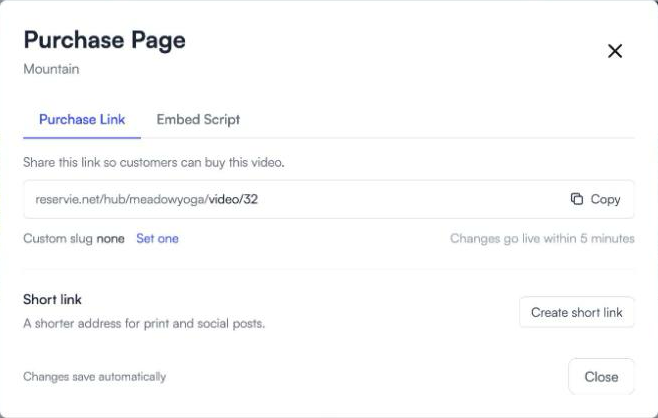
Click Copy and paste the link into an email, a message or a social post.
Give it a readable address
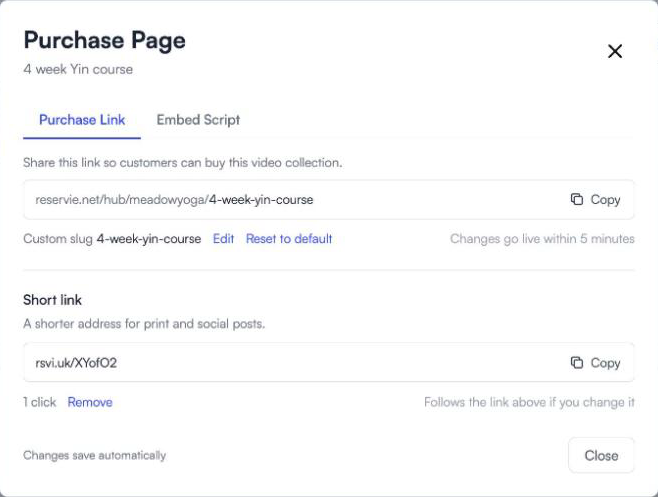
The address ends in a number to begin with. Click Set one next to Custom slug to use words instead, such as 6-week-yin-course.
- Use lowercase letters, numbers and hyphens.
- Each one must be different from every other address in your studio.
- Changes go live within 5 minutes.
- Reset to default goes back to the number. The old address keeps working and sends people to the new one.
Make a short link
Click Create short link for a shorter address that suits print and social posts. The dialog shows how many clicks it has had. If you change the custom slug later, the short link follows it.
Add a buy button to your own website
The Embed Script tab has a small piece of code to paste into your website where you want the button. Paste it once: if you change the price or picture later, the button updates itself.
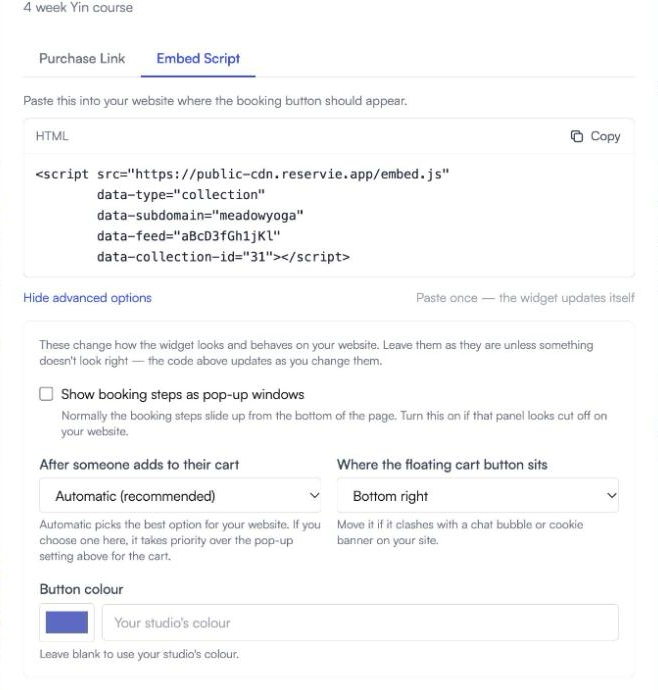
Advanced options change the button colour and how the cart and checkout appear. Leave them alone unless something doesn’t look right on your site.
When a link stops working
A video’s own page and short link stop working if you move it into a collection or delete it. The same goes for a collection you delete, so remove the old link from your website and emails.
Move a video back out of a collection and its page returns. Set a price for it first, because its old price was removed when it went in.